Image Optimizer Test (admins)
Campaign on Cafè Barbera
 Cafè Barbera
Status
Closed
Task Type
tweet
Points
1
Reputation
—
Special Rewards
—
Top submissions
Best entries from participants

Azraiel1201
@Azraiel1201
The best #Coffee for me. Thank you @Barbera_1870 https://t.co/MTZAZ9lK4i
- #2

crpytonium
@crpytonium
Man beside vintage Barbera delivery van, archival photo #CaffeBarbera #Since1870 #ItalianCoffee https://t.co/glOAmUY0Fe
- #3

0xMewMew
@0xMewMew
Do you like coffee? ☕️ Has anyone tried @Barbera_1870 coffee yet? A cup of good coffee in the morning is one of the best ways to start the day. Would love to hear your thoughts if you've tried it! 🙂 #Coffee https://t.co/pJd3gnvPhQ
The brief
See analyticsRequirements
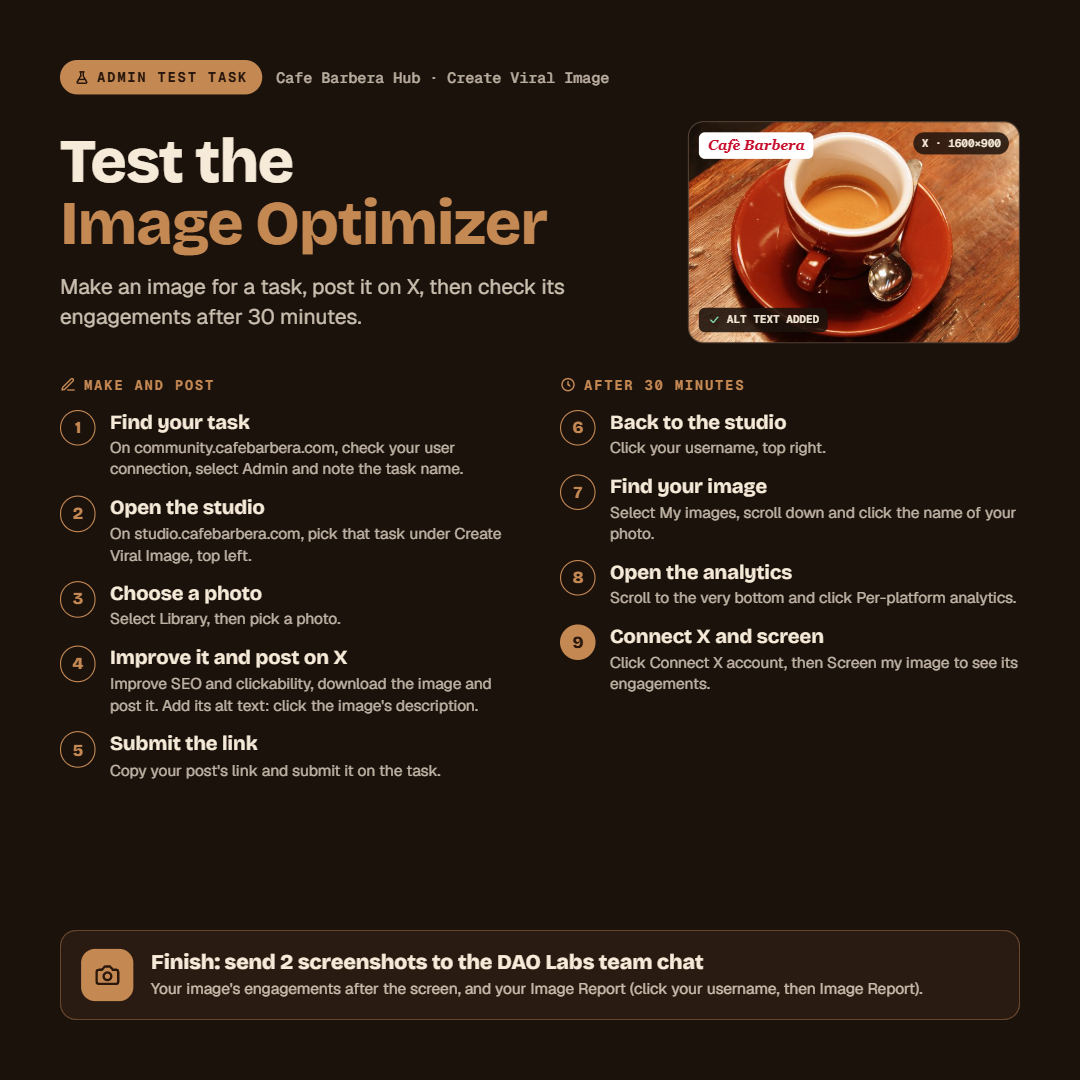
Invite only: Selected participants onlyHelp us test the Image Optimizer before it opens to all miners. Make one image for this task, post it on X, then check its engagements after 30 minutes. Tell us anything that breaks, feels slow or is unclear.
MAKE AND POST
1. Go to https://community.cafebarbera.com/, check your user connection, select "Admin", then open this task and remember its name and DONT forget to approve the task 1st .
2. Go to https://studio.cafebarbera.com/. Under "Create Viral Image" in the upper left corner of your screen, select the task.
3. Select "Library" and choose a photo.
4. Improve SEO and clickability, then download the image and post it on X. Don't forget the alt text: when you add the image to your post, click its description ("Add description" on X) and paste the image's alt text.
5. Copy the link of your post and submit it on this task.
6. Go back to the studio and click your username in the upper right corner of your screen.
7. Select "My images" and find the name of your photo. Scroll down and click that name.
8. Scroll to the very bottom and click "Per-platform analytics". You will see "Connect X account".
9. Connect your X account, then click "Screen my image".
FINISH
You will now see the engagements of your image. Send a screenshot of them in the DAO Labs team chat.
Found a bug, or something slow or confusing? Post it in the DAO Labs team chat with a screenshot.
Requirements
Must have a minimum of 50 X/Twitter followers to be eligible for Social Mining Tasks. If you do not have a Caffè Barbera account yet, please register by clicking the button below.
November 13, 2026 at 10:29 AM → November 16, 2026 at 11:59 PM
This task has ended
Rewards have been distributed to 6 participants
Analytics
How this task performed
Participants
6
unique miners
Impressions
1.2K
across submissions
Articles
0
long-form entries
Likes
63
Retweets
15
Replies
17
Bookmarks
1
Dwell Score
8.01%
engagement per impression